


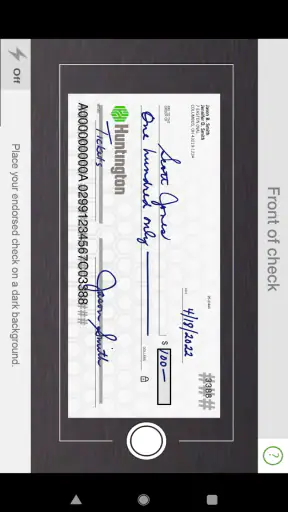
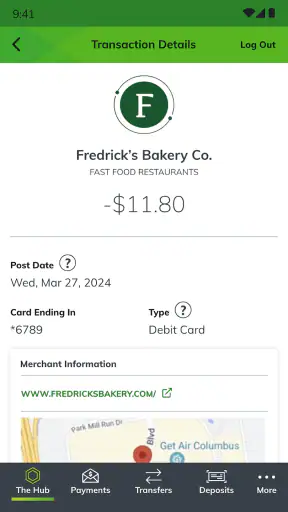
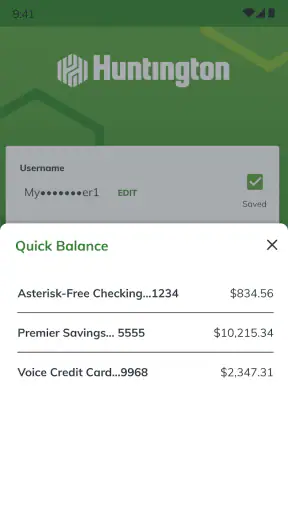
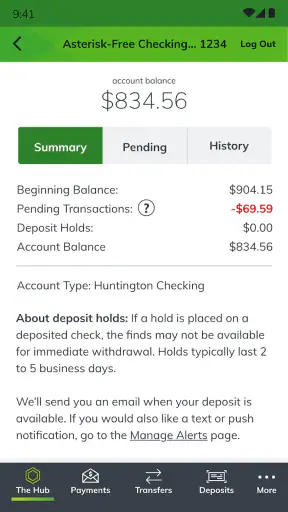
Opening a mobile banking app for the first time can feel more serious than installing an ordinary utility. You are not just checking a new interface; you are deciding whether it deserves access to the daily routines around your money. I spent time with Huntington Mobile Banking with that in mind, following the path a new customer is most likely to take: getting oriented, signing in, checking an account, and trying to turn the app into something useful rather than merely keeping it on the phone.
My overall impression is that this is a practical finance app for people who already bank with Huntington National Bank and want a dependable way to handle routine account tasks away from a desktop. It is free, aimed at Everyone, and has built a substantial audience, with more than a million installs and an average rating of 4.8 from roughly 78 thousand ratings. Those figures suggest a mature, widely used banking tool, but they do not remove the need to judge whether its workflow suits you.
From installation to a useful first session
What to expect before you begin
Huntington Mobile Banking is best understood as a mobile doorway into an existing Huntington relationship, not as a general-purpose money manager for people who use several unrelated banks. The developer is Huntington National Bank, and the app’s purpose is to let customers manage their bank accounts from a mobile device. That focus is helpful: the experience does not need to pretend to be a budgeting community, an investing platform, or a replacement for every financial service in one place.
That narrow focus also sets an important expectation. If you do not have Huntington accounts, the app is unlikely to become your main financial tool. Someone comparing banks may get more value from researching account terms and customer service first, while an existing Huntington customer can judge the app on a more direct question: does it make ordinary banking quicker and easier than using a browser or visiting a branch?
I found the strongest reason to use it in small moments. You may want to check whether a payment has cleared before making another purchase, confirm that a deposit appeared, or look at an available balance while away from home. These are not dramatic tasks, but they are exactly where a well-designed banking app earns its place. The value comes from shortening the distance between a question and a reliable answer.
The app is free to download, although that should not be confused with every banking service being free. Account rules, transaction conditions, and any charges connected to your banking relationship remain separate matters. I would read those terms through the normal Huntington channels rather than assuming that the app’s price tells you anything about account costs.
Setting up without rushing the important parts
For a first-time user, the safest approach is to install the app from the official Android or iOS store, open it, and move through the sign-in or enrollment process carefully. Keep your Huntington account information available, use a private connection you trust, and avoid starting the setup when you are distracted or in a hurry. Banking setup is one of those jobs where taking an extra minute is better than repeatedly guessing at a detail.
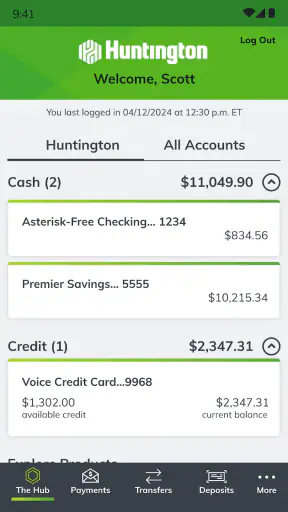
Once you reach the account area, pause and learn the layout before trying to do anything complicated. Look for the places where balances, recent activity, payments, transfers, and support are presented. The exact arrangement can change as the app is updated, so I would rely on the labels visible in your current version rather than following an old screenshot from someone else.
The current version is 6.78.204 and the app requires operating system version 10 or later. That requirement matters if you are using an older phone or keeping an aging device for banking. In that situation, check the operating system before blaming the app for an installation problem. Updating the phone may solve the issue, but if the device cannot meet the requirement, using a supported phone is the more sensible choice for financial access.
Security habits are part of setup, even when the interface makes them feel routine. Choose a login method you can use consistently, protect the phone itself, and do not hand an unlocked device to someone else while the banking session is open. I also recommend checking that the account name and recent activity you see after signing in are actually yours before exploring further. That simple confirmation establishes trust in the session.
Your first meaningful success
The best first action is not immediately sending money or changing a setting. It is confirming that you can sign in, identify the right account, and understand the current balance and recent transactions. That gives you a useful result with very little risk. You learn where the important information lives, and you create a baseline for future visits.
A realistic example is checking your account before paying for groceries. I would open the app, verify the account, review the latest activity, and compare the available amount with the purchase I am about to make. If a recent transaction is still pending, I would treat that as part of the picture rather than assuming the displayed balance tells the entire story. This habit is more valuable than simply opening the app to admire a clean dashboard.
Another useful first-session exercise is searching through recent activity for a familiar transaction. This tests whether you can distinguish an ordinary purchase from a pending item, a deposit, or a payment without committing to a new financial action. It also helps you notice how Huntington presents descriptions and dates. If you are trying to resolve a questionable charge later, knowing how activity is organized can save time.
After that, I would try one low-stakes task that you already understand, such as reviewing a scheduled payment or checking whether a transfer has completed. The point is not to tap through every available option. The point is to finish one action with confidence and know where to verify its result. The first successful session should leave you certain about what happened, not merely impressed by what the app can display.
Where new users can become confused
The most common source of confusion in mobile banking is the difference between a balance, an available amount, and activity that has not fully settled. A number can look reassuring while a recent purchase is still waiting to post, or a deposit can appear in a way that does not match your mental timeline. When something seems inconsistent, open the transaction details and check its status instead of refreshing repeatedly.
Pending activity deserves special attention because it affects everyday decisions. If you are deciding whether you can afford a purchase, consider commitments that have not finished posting. If you are checking whether a payment worked, look for evidence of its status rather than assuming that the absence of an error means completion. The app can show account information, but you still need to interpret the timing correctly.
Transfers and payments can also feel similar when you are new to the interface, even though they may serve different purposes. Before confirming anything, read the destination, amount, timing, and source account carefully. A small-screen workflow encourages quick taps, so I prefer to slow down at the confirmation stage and then return to activity afterward to make sure the result is recorded as expected.
Another point of friction is the temptation to use the app as the only explanation for an account issue. If a transaction looks wrong, take note of the merchant description, date, and amount before contacting support. That information makes the conversation more productive. If the concern involves account access or possible fraud, I would use Huntington’s official support route rather than trying to solve a serious problem through repeated sign-in attempts.
Notifications can be useful, but they should not replace reviewing the account itself. An alert may draw your attention to activity, while the account screen gives you the fuller context. I treat notifications as reminders to investigate, not as final proof that a transaction is legitimate or fully settled.
Turning occasional checks into a better routine
Once the first session feels familiar, the app becomes more valuable when tied to specific routines. I would use it before a large purchase, after expecting money to arrive, and when reconciling a bill. Those moments give the app a clear job. Opening it without a question can become a habit that creates worry without adding understanding.
For people paid on a regular schedule, a useful workflow is to check incoming activity, review recurring commitments, and then look at discretionary spending. This is not a full budgeting system by itself, but it can support a simple weekly review. The important insight is to separate money that is already committed from money that merely appears available at a glance.
I also like the idea of using the app as a verification step after an offline action. If you deposit money, make a payment, or move funds through another Huntington channel, return to the mobile account view and confirm the event when appropriate. That creates a record in your own routine and reduces the risk of relying on memory.
For households, the app may be convenient for the person who handles day-to-day checking, but it does not automatically solve communication between family members. If several people spend from related accounts, agree on who checks transactions and how unusual activity will be discussed. A banking app can make information easier to reach; it cannot replace a shared process for financial decisions.
How it compares with the usual alternatives
Compared with using a desktop banking website, the mobile app wins on immediacy. A phone is usually nearby when you need to confirm a balance or inspect a transaction, and a focused mobile layout can make a short check less cumbersome. The desktop alternative may still feel better for extended account review, especially when you want more screen space or prefer working with several browser windows.
Compared with visiting a branch, the app is more convenient for routine information and simple account management. It does not require travel or waiting, which makes it a better fit for a quick evening check or a decision made while you are out. A branch or direct support conversation remains preferable when the issue is complicated, sensitive, or difficult to explain through a sequence of screens.
Compared with an independent budgeting app, Huntington Mobile Banking has a different strength. It is closer to the source of your Huntington account activity, while a separate budgeting tool may be better for combining accounts from different institutions, categorizing spending across a household, or building a broader financial plan. If your main goal is cross-bank organization, this app alone may feel too limited. If your goal is direct access to Huntington banking, adding another app may create unnecessary duplication.
That trade-off is central to my recommendation. I would choose Huntington Mobile Banking for a Huntington customer who values quick account visibility and mobile control. I would not choose it as the sole tool for someone whose finances are spread across several banks or who wants detailed long-term planning in one dashboard.
Small habits that make the experience safer and clearer
- Verify before acting: identify the correct account and read the amount and destination before confirming a payment or transfer.
- Check status, not just totals: open recent activity when a balance or payment timing seems unclear, especially around pending transactions.
- Use a repeatable review: check expected deposits, committed bills, and recent purchases in the same order so unusual activity stands out.
- Keep the app in perspective: use it for Huntington account access, but turn to a broader budgeting tool when you need a combined view of several institutions.
These habits are more useful than trying to memorize every screen. Banking interfaces evolve, and the current version may arrange controls differently over time. What lasts is the method: confirm identity, understand status, act deliberately, and verify the result.
Who should use it, and who should look elsewhere
I would recommend the app to an existing Huntington customer who wants a straightforward mobile way to monitor accounts and handle ordinary banking tasks. It is especially suitable for someone who checks money frequently but does not want to sit at a computer for every small question. The Everyone content rating also makes it broadly approachable, though younger users and shared-device households should still follow sensible account-security practices.
I would be more cautious about recommending it to a person choosing a bank primarily because of its app. Mobile convenience matters, but it should come after considering whether Huntington’s accounts, availability, and service model fit your needs. The app cannot compensate for a banking relationship that is otherwise unsuitable.
It may also be the wrong primary choice for a user who expects advanced financial analysis, deep investment tracking, or automatic organization across unrelated institutions. In that case, a dedicated personal-finance service may offer a better overview, while Huntington’s app remains useful as the direct source for Huntington activity.
My final take after the first week of use
Huntington Mobile Banking succeeds by making ordinary banking reachable at the moment a question appears. Its strongest experience is not a flashy feature; it is the short path from opening the phone to understanding what is happening in a Huntington account. The app is free, established since June 6, 2011, and currently maintained at version 6.78.204, which gives it the feel of a mature banking companion rather than a new experiment.
There is still a learning curve around pending activity, account terminology, and knowing when a mobile screen is not enough to resolve a serious issue. Those are meaningful limitations, but they are manageable if you slow down at confirmation points and treat transaction status carefully. I would also avoid expecting it to replace a full budgeting platform or personal support for complex cases.
After setup, the next step I would suggest is simple: use it for one real routine, such as checking recent activity before a purchase or confirming an expected deposit. Once that feels natural, add a regular review of pending and completed transactions. For Huntington customers who want practical control from a phone, this is an app I would comfortably recommend to a friend. For everyone else, its usefulness depends first on whether Huntington is already the bank they need.


